WeGoIgo2.3.2
Publisher Description
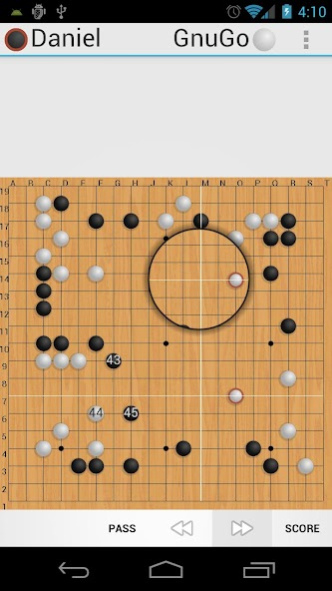
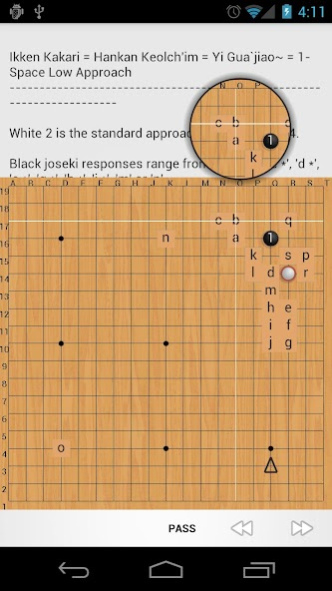
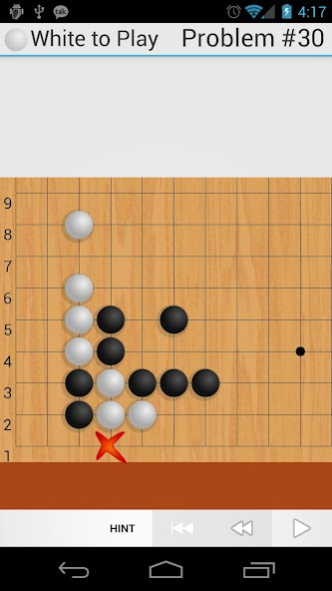

★★★ WeGoIgo 2.0 is finally here! ★★★
This new version is almost a complete rewrite with dramatic improvements in almost every way! If you encounter any problems, PLEASE send me an email. I have done my best to test this release thoroughly, but because of the sheer number of changes, it is hard for me to be certain that everything is stable. Thank you for your patience with this new release!
NOTE: If the "score" button is unavailable during games, you might be using an old version of GnuGo. Make sure you have the latest GnuGo for WeGoIgo version 1.2 for the scoring functionality to work.
NOTE 2: WeGoIgo hides the magnifying glass for "large" and "extra large" screens. If you would like to have the magnifying glass on your device but don't, send me an email.
For all your Go (aka Igo/Baduk/Weiqi) needs!
Play, load, and save games; study games, including auto-play mode; solve Tsumego (Go Problems); review games and add annotations; study Joseki-- all from one app!
Features:
* Magnifying glass-style stone placement-- unique on Android. See exactly where you're placing your stone!
* Support for Kogo's Joseki Dictionary-- also unique on Android! Download using the SGF Fetcher under "Tools," then load from the Joseki memory. It's a big file, so the initial load may be sluggish-- please be patient!-- but future loads are near-instant.
* Support for all variety of Tsumego formats. Supports WV (wrong variation) tag described on UliGo, TR (triangle) optionally, and the RIGHT/WRONG tags from goproblems.com. Let me know if I'm missing something!
* Auto-play mode when studying games. Sit back and watch as it gets played! Has five speed settings.
* [NEW] Review games right on your device. Edit comments, add annotations (labels, shapes, even place stones!)
Notes:
WeGoIgo does not yet come with archive games, Joseki libraries, or Tsumego, but it does include an SGF Fetcher Tool to help automatically download some freely available collections.
WeGoIgo does not have its own built-in computer player, but supports external AI. I have ported GnuGo for use with WeGoIgo, and it is available for FREE on the Market-- just click on the "More from this developer" link.
I don't subscribe to goproblems.com so I don't have access to the full DB for testing, but they should work.
---
I use this app myself for Go practice, and am just as interested in perfection as you. Please report any problems to me, and I'll do my best to get it fixed!
If you don't want to spend any money, check out my ad-supported WeGoIgo Lite. While it may not be updated as quickly as this, or contain included games/problem sets that this may contain in the future (it doesn't yet, of course), it otherwise has all the same great features, at the unbeatable price of free!
About WeGoIgo
The company that develops WeGoIgo is Daniel Leong. The latest version released by its developer is 2.3.2. This app was rated by 3 users of our site and has an average rating of 3.3.
To install WeGoIgo on your Android device, just click the green Continue To App button above to start the installation process. The app is listed on our website since 2014-08-02 and was downloaded 671 times. We have already checked if the download link is safe, however for your own protection we recommend that you scan the downloaded app with your antivirus. Your antivirus may detect the WeGoIgo as malware as malware if the download link to us.danlib.igo is broken.
How to install WeGoIgo on your Android device:
- Click on the Continue To App button on our website. This will redirect you to Google Play.
- Once the WeGoIgo is shown in the Google Play listing of your Android device, you can start its download and installation. Tap on the Install button located below the search bar and to the right of the app icon.
- A pop-up window with the permissions required by WeGoIgo will be shown. Click on Accept to continue the process.
- WeGoIgo will be downloaded onto your device, displaying a progress. Once the download completes, the installation will start and you'll get a notification after the installation is finished.
Program Details
System requirements
Download information
Pricing
Version History
version 2.3.2
posted on 2014-08-02
For more about the 2.0 update: http://goo.gl/OkcnP,v2.3.2:,- Various crash fixes,v2.3:,- "Help" link to a WeGoIgo Wiki,- Rewind button in Joseki/Study,- Setting to always use Magnifying Glass,- Delete SGF files from context menu,- Tweak the rendering/positioning of Magnifying Glass to make better use of screen space,- FIX issue "adjust move" feature, where you wouldn't be able to play on the old position,- Various other bug fixes
version 1.13
posted on 2011-04-22
Several fixes and updates
